Guide · Client work
How to share project progress with clients without another account.
Set up a client-ready board, share its read-only view, and keep the same link useful throughout the engagement. Here is the workflow in KanbanTrack.
Get started1. Create a project for the engagement
Sign in with Google or GitHub. From the dashboard, select New project, enter a descriptive name such as “Studio website redesign,” and choose the Client Project type. Select Create project.
Use a separate project for each client engagement so the shared link opens the relevant board.
2. Add tasks the client can understand
Add concrete deliverables such as “Approve homepage direction” and “Deliver component library.” Give each card a description that makes sense to your client. Review what appears publicly before adding confidential notes.
Move work through To do, In progress, Waiting client, and Done. Use Waiting client when the next step needs the client’s input, and explain what you need in the card description.
3. Create and review the public link
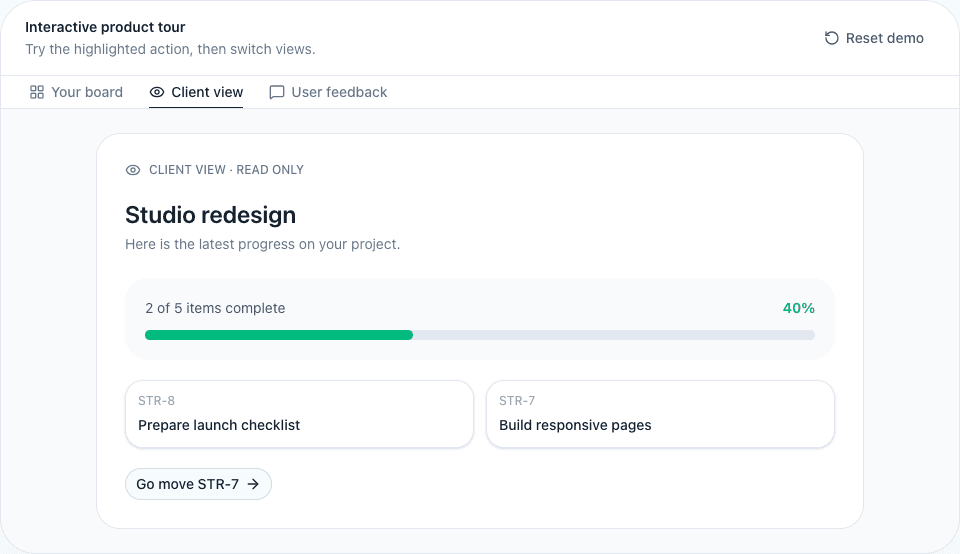
Select Create public link for the project. Open the link in a signed-out browser window and check the task titles, descriptions, and status. The client should see the read-only view without your editing controls.
Anyone who has this active link can access the view. Share it only with the intended recipients.
4. Send one link and keep the board current
Copy the link using Copy public link and include it in your client update. For example:
“Here is the progress board for your website redesign. You can open it without an account. The homepage direction is ready for review; I have marked the next step as Waiting client.”
Update the cards as you work. Ask the client to reopen or refresh the board when checking the latest status. The board complements your conversations; it does not send an update message for you.
5. Close access when it is no longer needed
Use Revoke to disable the link. Use Rotate link when you need a replacement; the old link stops working, so send the new one to the client. If this browser no longer has your original link, the app may offer rotation instead of copying it.
Before you send your first link
- Check the shared view while signed out.
- Make sure the card descriptions are suitable for the client.
- Confirm tasks waiting on the client explain the next step.
See the client progress tracker overview, or learn how to collect product feedback on your website.
Start with one project.
Sign in with Google or GitHub, create your board, and choose what to share.
Create your board